AI tools aren’t new anymore. If you’re a freelance writer and you’re not using them, you’re working harder than you need to.
But there’s a difference between using AI well and using it badly. The freelancers who are thriving right now use AI to handle the tedious parts of the job so they can focus on the work that actually matters: the thinking, the interviews, the expertise, the relationships.
The ones who are struggling?
They’re either ignoring AI entirely or using it as a crutch to produce mediocre content that clients can spot a mile away.
Here are 10 ways to use AI tools that will actually make you better at your job, not replace the things that make you valuable.
How to Use AI Writing Tools to Supercharge Your Business
1. Beating the Blank Page
The hardest part of any writing project is starting. You’re staring at a blank doc, you know the topic, but you can’t figure out how to begin.
This is where AI shines. Not to write for you, but to get something on the page so you can react to it.
Ask ChatGPT or Claude for 10 angles on your topic. Ask for different ways to open the piece. Ask what questions a reader might have. Most of what it gives you won’t be great, but it breaks the paralysis. Now you have something to work with instead of nothing.
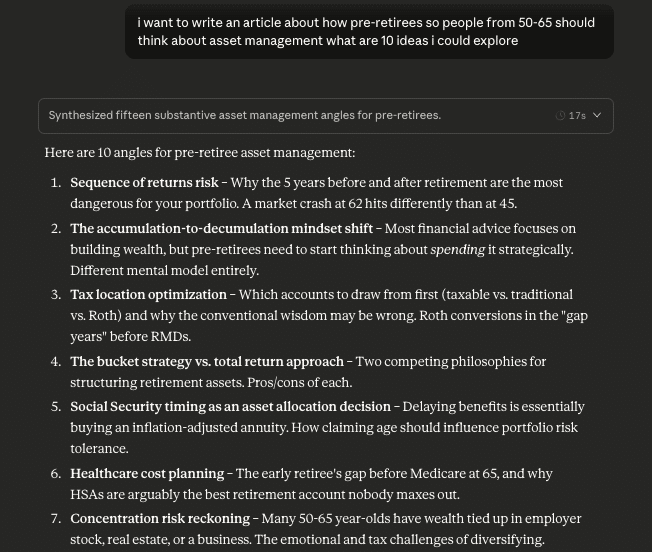
I use this constantly when I’m stuck on a pitch or can’t figure out how to frame an article. I don’t use what AI gives me word-for-word. But it gets my brain moving, and that’s the point.
2. Outlining
Before I write anything, I outline. Every blog post, every article, every pitch. It’s how I organize my thinking before I start drafting.
AI is great for this. Give it your topic and ask for a structure. Ask for subheadings. Ask what sections a reader would expect to see.
You can even work with your preferred tool to come up with a standardized process of outlining for your work. For example, I have a setup in Claude where it asks me intake questions for when I write my own content.
I type out all the key stuff about the audience, what I think the goals are, what the most important points to cover are, quotes or data I gathered from my research, thoughts about how it all ties together, and it spits out some outline ideas which can get me started.
Sometimes it just really helps to write things out messy and in your own words to get something down on the page, and then you can massage it later.
You won’t use everything it gives you. But it speeds up the process of figuring out how to organize your piece. And sometimes it suggests an angle or section you hadn’t thought of.
If you struggle with structure or spend too long staring at your notes trying to figure out where to start, this one’s for you. And if you’re not sure how to make a good outline, ask your AI!
3. Research Assistant
Freelance writing involves a lot of research. You’re reading articles, reviewing reports, digging through studies, and trying to pull out the relevant bits for your piece.
AI can speed this up significantly. Paste a long article into ChatGPT and ask for a summary. Ask it to pull out the key statistics. Ask what the main argument is.
I personally love Perplexity for research — it’s one of the three AI tools I use constantly. It searches the web and gives you answers with sources, so you can quickly get up to speed on a topic and then dig into the actual sources it cites. It’s like having a research assistant who does the initial legwork for you.

Stop wasting hours hunting for current data. Perplexity Pro finds verified stats in minutes with full citations.
This doesn’t replace actually reading the source material. But it helps you triage. You can quickly figure out if an article has what you need before spending 20 minutes reading the whole thing. The worst feeling is thinking you’ve found a great stat, only to discover it’s from 2014.
You can also do this after SME (subject matter expert) interviews, conference talks, webinars, even YouTube videos.
Get your Otter transcript, and paste the quotes you like best into Claude and ask it to summarize the expert’s main points or expand on how they may best relate to the topic. It can help you see the structure of what you’ve got before you start writing.
4. Drafting Cold Emails and LOIs
Writing letters of introduction gets old. You know you need to send them, but staring at a blank email trying to figure out how to introduce yourself for the hundredth time is exhausting.
AI can give you a starting point. Ask it to draft a cold email from a freelance writer to a marketing agency. Ask for five different versions. Ask it to make one shorter. AI might be able to get you 70-80% there on it’s own but it’s critical that you do the last step yourself because that’s what can set you apart from everyone copypasting directly from the chat.
Also, use it to research. For example, see if the agency or company you want to email has been in the news lately for something positive. Their winning an award at a conference or releasing a new study can be a perfect way to start an outreach email with a personalized first sentence.
The key word here is starting point. You’re not sending what AI gives you. You’re using it to break through the mental block, then adding personalization and making it sound like you.
That first sentence should always be personal. Mention something specific about the company or its content. AI can’t do that part. But it can give you the structure so you’re not starting from zero every time.
5. Headlines and Hooks
A headline can make or break your content. It doesn’t matter how good the article is if no one clicks.
But I actually find headlines really hard. You’re trying to be compelling without being clickbait, specific without being boring, and short without losing the point.
AI is great for generating options.
Ask for 10 headline ideas for your topic. Ask for variations that are more urgent, more curiosity-driven, or more specific. Ask it to punch up a headline you’ve already written.
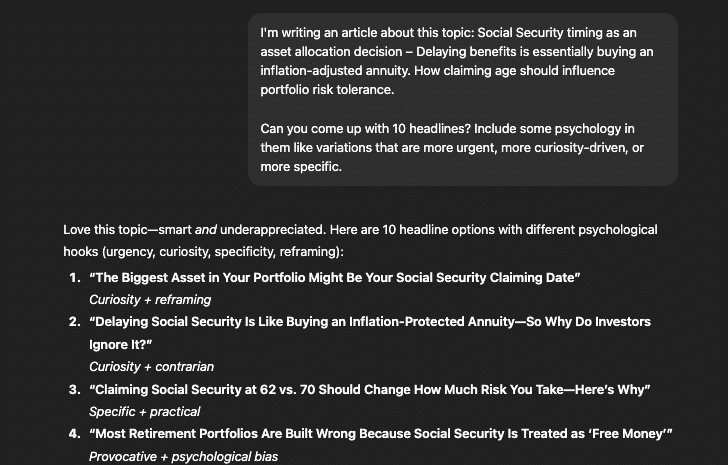
I don’t usually use headlines exactly as AI gives them. But having 10 options to choose from is way easier than staring at a blank line, trying to come up with the perfect one from scratch.
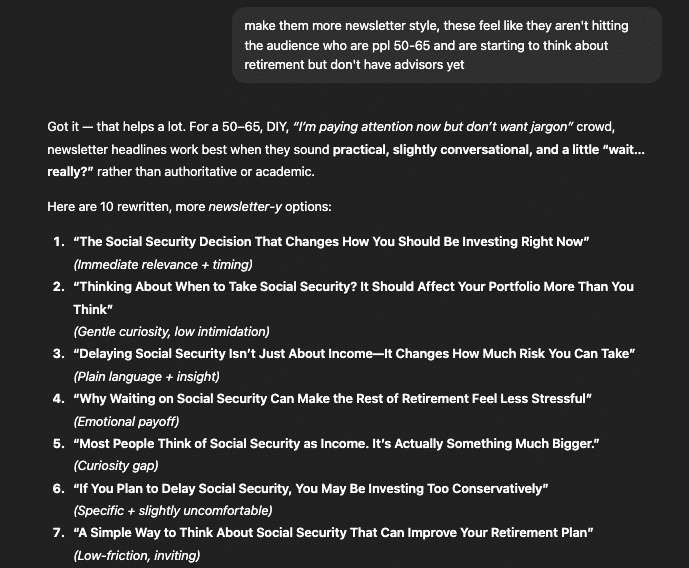
And usually, I’ll find the headline samples spark an idea, or I can combine parts from 2-3 to really hit what I want. And if I hate them, then I give more context and try again.
See how these are much better headlines? I may not know what I love, but I always know what I don’t like, and it sounds wrong.
The same goes for opening lines. If you can’t figure out how to start a piece, ask AI for five different ways to open it. Pick the direction that feels right and write your own version.
If you’re someone who really gets stuck on introductions, AI can be so helpful in organizing your thoughts or tweaking what you want say.
6. Editing and Proofreading
Your eyes miss things. You’ve read the same paragraph five times, and your brain fills in what it expects to see instead of what’s actually there.
AI can be a fresh set of eyes. Paste your draft into ChatGPT or Claude and ask it to check for wordiness, unclear sentences, or awkward phrasing. Ask it to flag anything confusing.
I’ll even ask it to role-play a bit. You can ask it to be an editor and share its thoughts. Or go a step further and have it be the intended audience, get them to tell you what’s confusing, what doesn’t make sense, and what they want more of.
I love (and use) Grammarly daily to catch grammar issues and simplify overly complex sentences. And use it for everything I write. But it’s nice to have another set of eyes on things.

I can't think of a good reason why anyone shouldn't at least have the free version of Grammarly installed. It's SO incredibly helpful. And if you upgrade? It's even more useful. Here's a free month of Grammarly premium on us.
*Free plans and paid plans.
This isn’t about letting AI rewrite your work. These tools help you catch the stuff you missed. You’re still making the final call on every change.
7. Content Repurposing
You wrote a 1,500-word blog post. Now you need to promote it. That means LinkedIn posts, maybe a newsletter mention, or a Twitter thread.
Writing fresh content for every platform is exhausting. AI can help you repurpose what you’ve already written.
Paste your blog post into ChatGPT or Claude and ask for what you want (be specific):
- Three LinkedIn post ideas based on the content.
- A short newsletter intro.
- The key takeaways in bullet form to make a great X (Twitter) post.
You’re not copying and pasting what it gives you. But it pulls out angles and snippets you might not have thought of, and it saves you from staring at your own article trying to figure out what to say about it.
This is especially useful if you’re building your own audience on LinkedIn. You’ve already done the thinking for the article.
I wrote a LinkedIn article, then asked Claude to give me 5 simple starters that pull data from it to make a good hook that gets some clicks, and 5 longer posts that I could pull from my article and link to in my posts.

Now I have an article that I can share 5 more times in different ways, each highlighting a new angle or point. That’s how you can help yourself get found without doing a ton of extra work. I already did the heavy lifting of writing the piece; let AI make it easier.
Let AI help you squeeze more value out of what you’re writing. Every freelancer now should be getting at least 5-10 pieces of content from every single thing they write.
Plus, this is a great skill to build for your own projects, which you can then offer to your clients. Content repurposing is really undervalued right now, and every brand out there needs it.
8. Interview Prep
Before any SME interview, I spend time preparing questions. The better your questions, the better quotes you get, and the better your article turns out.
AI can help you prepare. Tell it who you’re interviewing, what the topic is, and what angle you’re exploring. Use Perplexity to give you some recent data or research on the topic. Ask for 10 questions that would get interesting, specific answers.
You won’t use all of them. But it helps you think through angles you might have missed.
And if you’re interviewing someone in an industry you’re new to, AI can help you get up to speed fast so you don’t waste the expert’s time with basic questions you could have Googled.
I also use this when I’m nervous about an interview. Having a solid list of questions ready makes the whole conversation easier.
9. Working With Transcripts
If you do SME interviews, you probably use a transcription tool like Otter. You end the call with a wall of text and need to turn it into something usable.
Never lose an interview again. Otter transcribes in real-time and saves you 2+ hours per call.
AI can help you make sense of it. Otter, for example, has a built-in chat feature. So once you record a call (with permission), you can see a summary and then ask the chat to pull out the best quotes, summarize the expert’s main points, or organize the conversation by theme.
This is especially helpful when an interview goes long or the expert jumps around between topics. Instead of reading the whole transcript three times, trying to find that one thing they said about compliance, ask the chat to find it for you.
However, it’s critical to verify every quote against the original audio before publishing; you don’t want to misquote or misinterpret anyone. But AI can cut down the time it takes to find what you’re looking for.
10. Tracking Your Marketing
If you hate spreadsheets, AI can be your marketing tracker.
I use Claude to keep track of my outreach. After a marketing session, I tell it the date, who I contacted, what I sent, and any responses I got. It remembers everything.
Then, at the end of the month, I ask for a summary. How many LOIs did I send? How many follow-ups? How many turned into calls? How many turned into clients?
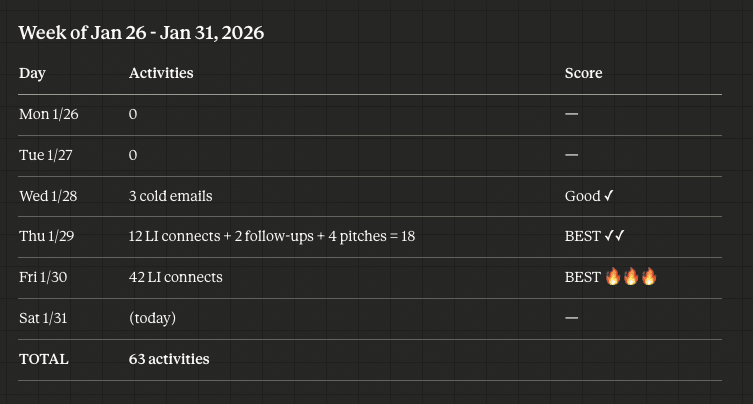
And I can ask Claude to break each of these activities down, so I know who I sent LinkedIn connections to, what the pitches were, and who got the cold emails.
I’ve tried a million ways to track all this on my own, and I’ve given up, so I love this system using Claude Cowork.
Over time, you start seeing patterns. Maybe you need 50 cold emails to land one client, so it’s time to tweak your copy, or your offer isn’t landing. Maybe your follow-up rate is too low. Maybe you’re getting way more responses in one subset of your niche than another.
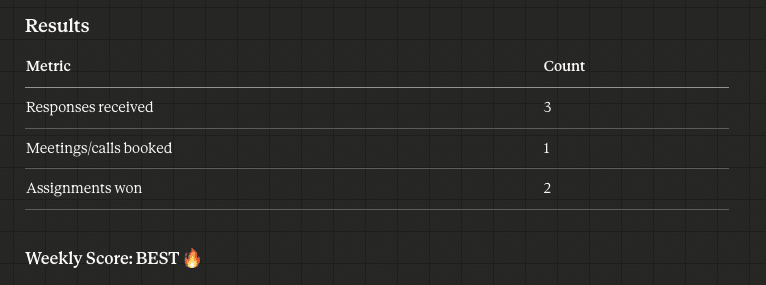
I told Claude I love gamification, so the setup helps me stay motivated. I have a weekly ‘scorecard’ that is good, better, best, and Claude lets me know what I’ve hit.
Mine is much more detailed, including names and dollar amounts, but I asked Claude to remove personal information for this screenshot.
It’s like having a marketing assistant who never forgets anything. And it beats staring at a spreadsheet you’ll never actually update.
What NOT to Do With AI
AI can make you faster. It can’t make you better if you use it wrong.
- Don’t submit AI drafts as final work. Clients can tell. Editors can tell. AI writing has a generic, hedging quality that experienced readers spot immediately. Use AI to start, but the finished product needs to be yours.
- Don’t use AI for the parts that make you valuable. The interviews, the expertise, the original thinking, the relationships with sources — that’s what clients are paying for.
- Don’t skip verification. AI absolutely loves to confidently make things up. If you’re pulling facts, quotes, or statistics from AI, verify them against real sources before publishing. One wrong fact can tank your credibility.
If you outsource that to AI, you’re competing with everyone else who can type a prompt.
The freelancers who are winning right now use AI as a tool to handle the tedious stuff so they can focus on the work that actually matters.
Join over 40,000 people who have taken our 6 part freelance writing course. Sign up below and let’s do this together.
By entering your email address you agree to receive emails from Location Rebel. We'll respect your privacy and you can unsubscribe at any time.
The Bottom Line
AI tools are only going to become more ubiquitous. The freelancers who figure out how to use them well will be faster, more efficient, and able to take on more work without burning out.
But the tools are just that — tools. They handle the tedious parts so you can focus on what actually matters, like the thinking, the expertise, and the relationships that make your work valuable.
Start with one or two of these use cases. Get comfortable. Then add more as you figure out what fits your workflow.

Sean Ogle
Sean Ogle is the Founder of Location Rebel where he has spent the last 12+ years teaching people how to build online businesses that give them the freedom to do more of the things they like to do in life. When he's not in the coffee shops of Portland, or the beaches of Bali, he's probably sneaking into some other high-class establishment where he most certainly doesn't belong.Join over 40,000 people who have taken our 6 part freelance writing course. Sign up below and let’s do this together.
By entering your email address you agree to receive emails from Location Rebel. We'll respect your privacy and you can unsubscribe at any time.